

CADWorx® Plant Professional CADWorx projects can be leveraged forward into larger Smart 3D projects, giving you the ability to deliver intelligent models for multiple client sites with a single tool. All CADWorx products can use either AutoCAD® or BricsCAD® as their CAD platform. Operating in a native DWG common data environment, CADWorx workflows are executed in seamless coordination with all disciplines including BIM, Mechanical, Electrical, and Civil.
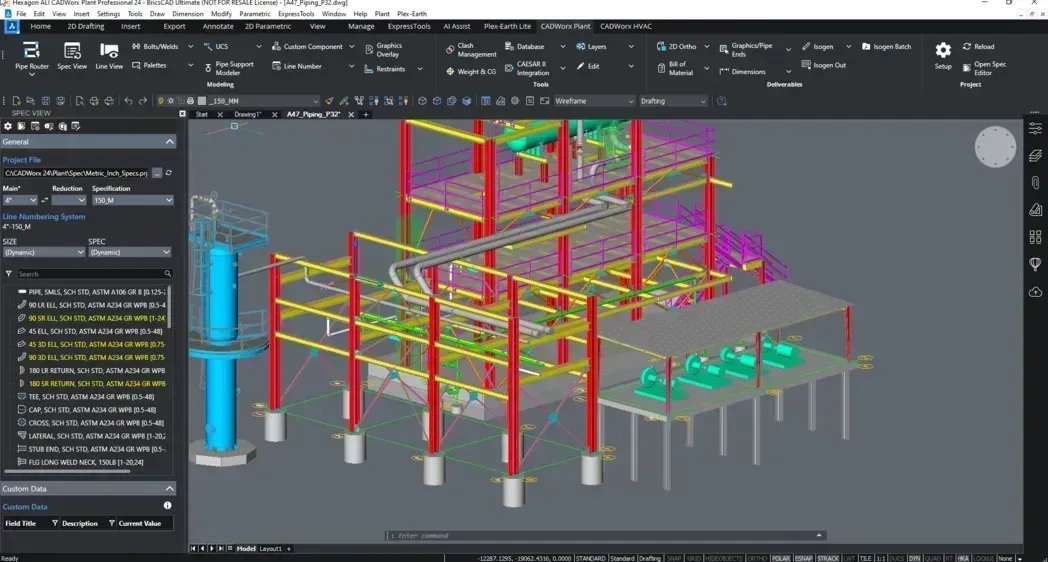
A complete solution for the next generation of plant design and automation, CADWorx® Plant Professional includes the most complete DWG file-based range of tools for effective plant design and offers unparalleled flexibility and collaboration.
CADWorx Plant Professional runs on the AutoCAD® or BricsCAD® platforms. This provides a complete package with powerful and adaptive tools that enable quick and easy creation of fully intelligent 3D plant models.
The process of creating piping and instrumentation diagrams should be fast, efficient and transparent. With CADWorx® P&ID Professional, you can make fully intelligent process diagrams that seamlessly tie into your current corporate standards. The solution uses both industry-standard symbols and those that you use internally through its programming-free interface.
In addition to complete library access, you can create a user-defined project database that communicates to current project drawings.
CADWorx® Structure Professional is an integrated CAD modelling structural design software that provides easy-to-use tools, intelligent drawing capabilities and advanced levels of automation, all created with the structural designer and engineer in mind. The software is quick, easy to set up and simple to use, empowering designers and engineers to work efficiently together on large and small projects alike.
CADWorx® Design Review Professional
Allows the review and publishing of CADWorx models by designers, managers, owners and other stakeholders. Discover how you can improve collaboration by utilizing tools for markups, design comments and redlining. By using CADWorx® Design Review Professional, users are able to create realistic visualizations and access the intelligent information.
OrthoGen for CADWorx® Plant Professional
OrthoGen for CADWorx® Plant Professional enables 2D plans, sections and elevations drawings to be created automatically from CADWorx Plant Professional 3D models. Even in today’s 3D world, annotated and dimensioned orthographic drawings are still a required deliverable. OrthoGen reduces this process from hours to only minutes.
AX3000® MEP Professional
AX3000® is a CAD-based MEP solution used for Heating, Ventilation, Sanitary and Electrical system designs that is compatible with BricsCAD® and AutoCAD. Intuitive design interface allows the user to plan and design in 3D. The
modular build of the AX3000 components enables users to apply the modules of the software they need on their projects.
iConstruct PRO
BIM software for Autodesk Navisworks
iConstruct PRO is a building information modeling (BIM) software for Autodesk Navisworks®, suitable for a large range of industries worldwide. It uses advanced features to improve
project performance, and drive collaboration and efficiency across the project lifecycle by ensuring a high-quality conditioned model.
iConstruct
A powerful scalable solution for AWP
iConstruct is the award-winning BIM software that saves up to 200 hours per month for Planners, BIM/VDC Coordinators and other engineering professionals in Energy & Resources, infrastructure and AEC industries.
What are the benefits of CadWorx Plant?
CadWorx is a software package widely used in the design and engineering processes of industrial plants. A CAD (Computer-Aided Design)-based tool, CadWorx is used in 3D design, engineering analyses, pipeline design, and many other areas. Some of the key benefits of CadWorx include:
1. Fast and Efficient Design
3D Modeling: CadWorx enables rapid and accurate 3D modeling of complex industrial plant elements such as pipelines, plumbing equipment, and structures.
Data Richness: Detailed data on materials, dimensions, and other parameters used at every stage of the model design process is provided.
2. Advanced Integration
AutoCAD-Based Work: Because CadWorx runs on the AutoCAD platform, the learning curve for AutoCAD users is quite low. Projects can be worked on using the powerful tools AutoCAD offers.
Compatibility with Other Software: CadWorx is compatible with many engineering and analysis software. This allows for data sharing and integration across disciplines.
3. Accuracy and Error Reduction
Clash Detection: Thanks to 3D modeling, it is easy to identify whether different components of the design overlap with each other. This prevents errors during construction in the first place.
Design Improvements: Because clashes and design errors are identified at an early stage, time and cost savings can be achieved throughout the project.
4. Efficiency and Time Savings
Automatic Pipe Details: CadWorx can automatically generate pipeline details. This allows engineers and designers to quickly obtain pipeline assembly details.
Parametric Design: Because the designs are parametric, the entire model is automatically updated whenever changes are made, preventing incorrect rework.
5. Simplifying Pipeline Design
Piping Design: CadWorx offers a rich library of pipelines, ensuring the accurate placement of all components, such as pipelines, connections, and flanges.
Piping Stress Analysis: Stress analysis can be performed on pipelines, ensuring safe and efficient operation.
6. Cost and Time Estimation
Cost Calculations: During the design process, cost estimates can be made for elements such as materials and labor used.
Schedule: A schedule can be created for each phase of the project, ensuring timely completion.
7. Project Management and Reporting
Reporting Tools: CadWorx can generate reports on project progress. These reports help project managers manage time, costs, and resources more efficiently.
Advanced Project Planning: Each phase of the project can be tracked in detail, and necessary improvements can be planned.
8. Documentation and Drawings
AutoCAD Drawings: CadWorx can export all design data in AutoCAD format and automatically generate all drawings for the project. This greatly simplifies the creation of engineering documentation.
9. Compliance with International Standards
Global Use: CadWorx is widely used worldwide and complies with many different engineering standards. This increases workforce efficiency on international projects.
As a result, CadWorx accelerates the design process in engineering and industrial facility projects, increasing accuracy, reducing errors, and lowering costs. Features such as 3D modeling and parameter-based design enable more efficient project management.


